As a matter of fact, the office is technically closed after a 24 hours to their employees. Basically, it is foresee that more regional offices will be closed for sure.
Commitments to their local customers? Save your breath.
At least a dozen of their existing and new customers are shouting out loud now.
By the way, I'm a certified CA Clarity Technical Consultant that haven't receive my cert yet since last year examination. Bumpy, should I send the request directly to US or what? LOL
CA to reduce Asian presence
By Victoria Ho, ZDNet Asia
Tuesday, November 20 2007 07:53 PM
Software vendor CA is closing its Malaysian office, tallying up to a total count of six offices in the region that have already closed, or that will be downsized soon.
In a statement released Tuesday, the U.S.-based company confirmed its office in Malaysia will be "migrating to a channel partnership strategy" for its sales and account operations.
"We will maintain a direct sales relationship with our large global customers in the region and in their headquartered countries, but the majority of our customers will now be served by independent [third-party] organizations," said CA in the statement.
In sum, the software vendor will no longer maintain a direct presence in the affected markets, where its customers will be serviced by appointed partners.
As a result, the company confirmed that its staff strength will be downsized.
Daphne Chung, Asia-Pacific research manager at IDC's system infrastructure and middleware software research division, said in an e-mail interview: "A more indirect or channels sales model allows vendors to broaden their reach into the customer base at a more cost-effective manner, compared to putting more [its own] sales people on the ground."
According to some media reports, CA's other offices in the region may also see the same fate.
ZDNet Asia's sister site, ZDNet Taiwan, said in a news article (published in Chinese) that the vendor's Taiwan office will be reduced to a six-person team--encompassing technical and finance employees--down from some 60 staff.
CA has are no plans to shut its Taiwan office, Hong Kong-based Raj Seth, CA's vice president of corporate communications for Asia-Pacific and Japan, said in an e-mail interview.
While Seth did not comment directly on the company's moves to lower its headcount, he confirmed plans to shift CA's overall regional operations to a channel strategy. He noted that channel partners will become the vendor's "primary sales interface".
According to the ZDNet Taiwan report, CA's Hong Kong office will cease operations from Nov. 28, with its office in Thailand to follow suit at an undisclosed date.
Total tally: six to close?
Last month, CA closed its Philippine and Indonesian offices, bringing the tally to a possible six in the region.
In addition, the ZDNet Taiwan article said the company is currently evaluating options to retain or shut down operations in Singapore and Beijing. CA has five other offices in the region: India, Australia, New Zealand, Japan and Korea.
CA declined to comment on its plans for the other offices.
Seth said: "Our new strategy arises from the realization that to provide a credible local presence, we must have an established local industry leader as our go-to-market entity."
He added that the company embarks on this new regional strategy "from a position of financial strength".
CA reported a 5 percent growth in revenues for its 2007 fiscal year, ended Mar. 31, at US$3.94 billion over last year's US$3.77 billion.
IDC's Chung foresees little disruption for customers as a result of CA's latest plans, but said the software vendor may have to deal with clients that are unused to a channel model.
"In particular, CA and its partners will have to work to win over those customers who insist or require a direct sales relationships with CA, and who do not fall into CA's category for large global customers in the region," she said.
In April 2006, CA's former chief executive Sanjay Kumar pleaded guilty to charges of financial fraud--two years after he was ousted from the company.
Showing posts with label CA Clarity. Show all posts
Showing posts with label CA Clarity. Show all posts
Tuesday, November 20, 2007


Thursday, June 28, 2007
CA Clarity (Niku) - LDAP Search Filter
You gotta take additional precaution steps when performing LDAP synchronization in Clarity because as of Clarity 7.5.3 FP5 it is not possible or legitimate to remove users from Clarity. You can only lock them or make them inactive.
There are 2 Java Job that comes with Clarity aims for LDAP synchronization.
First is "LDAP - Synchronize New and Changed Users" use to add/update user profile.
Second "LDAP - Synchronize Obsolete Users" use to inactivate user profile if the user already removed from the LDAP server.
"Search Filter" field in the NSA security settings define the condition to filter the list of users to be synchronized for both jobs.
The syntax of the Search Filter is compliant to the LDAP query syntax that you issue to the LDAP server.
For example, assuming your LDAP server has an attribute named "SamAccountName" (Clearly, my example is on AD) and you would like to obtain only the user that has "Eddy" in the attribute value, you can define such a filter like below
This will bring over users and inactivate users that meet the above criteria.
If you need to define multiple criteria, then you need to use a syntax similar to below:
The filter will then only filter on users that has "Eddy" in their account name and email ends with @hotmail.com. the & symbol indicate "AND" logical operator.
Note: The attributes in your LDAP server might not be the same like mine.
Note: You need to restart Clarity services to make the Search Filter effective
Warning:Based on my experience Just got reply from CA Support, the LDAP Remove User job only affect Clarity users who are "Active". User with "Lock" status are not affected. This is by design.
To test your LDAP synchronization, you might need to remove the records from CMN_DIRECTORY_SERVERS table manually to reset the Last Synchronization Date.
There are 2 Java Job that comes with Clarity aims for LDAP synchronization.
First is "LDAP - Synchronize New and Changed Users" use to add/update user profile.
Second "LDAP - Synchronize Obsolete Users" use to inactivate user profile if the user already removed from the LDAP server.
"Search Filter" field in the NSA security settings define the condition to filter the list of users to be synchronized for both jobs.
The syntax of the Search Filter is compliant to the LDAP query syntax that you issue to the LDAP server.
For example, assuming your LDAP server has an attribute named "SamAccountName" (Clearly, my example is on AD) and you would like to obtain only the user that has "Eddy" in the attribute value, you can define such a filter like below
SamAccountName=*Eddy*
This will bring over users and inactivate users that meet the above criteria.
If you need to define multiple criteria, then you need to use a syntax similar to below:
&(SamAccountName=*Eddy*)(Email=*@hotmail.com)
The filter will then only filter on users that has "Eddy" in their account name and email ends with @hotmail.com. the & symbol indicate "AND" logical operator.
Note: The attributes in your LDAP server might not be the same like mine.
Note: You need to restart Clarity services to make the Search Filter effective
Warning:
To test your LDAP synchronization, you might need to remove the records from CMN_DIRECTORY_SERVERS table manually to reset the Last Synchronization Date.
Friday, September 08, 2006
CA Clarity Boot Camp '06 in Malaysia
After 3 weeks of intense boot camp training, finally the D day. Completed all exams with consistent scoring and time of completion, wonderful. *thumbs up*
A photoshooting session in the last day, and here is the Yahoo! photo album that contain pictures from one of my classmate's camera (Sony Cybershot W5).
Yahoo! photo album
And a souvenir from CA Malaysia as a token of appreciation for the completion of the course and certification. See below.
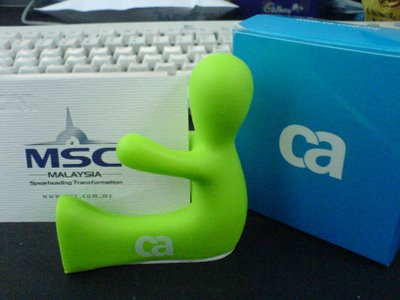
Name Card Holder
What most matter now is the prepareness into real world projects. Certification is one thing, implementation would be a totally different dimension. Good luck to every certified technical guys in my class.
A photoshooting session in the last day, and here is the Yahoo! photo album that contain pictures from one of my classmate's camera (Sony Cybershot W5).
Yahoo! photo album
And a souvenir from CA Malaysia as a token of appreciation for the completion of the course and certification. See below.
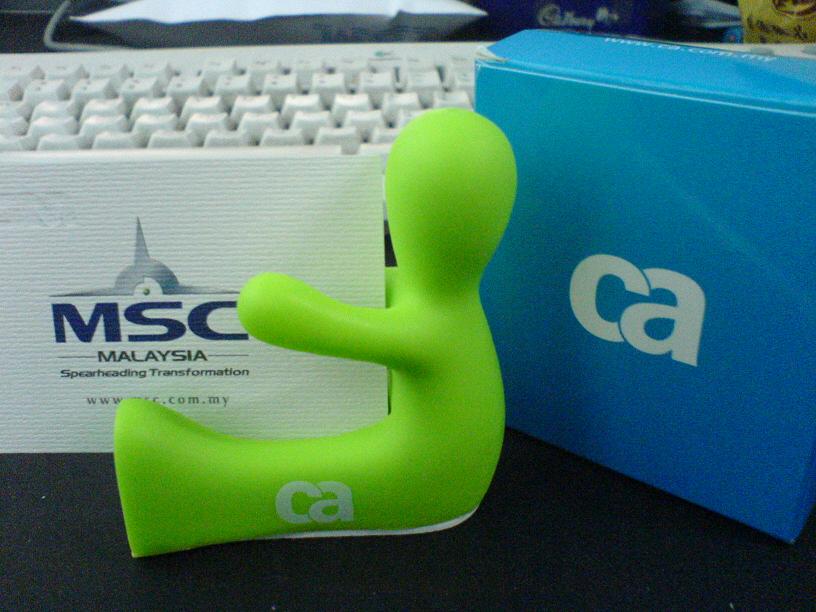
What most matter now is the prepareness into real world projects. Certification is one thing, implementation would be a totally different dimension. Good luck to every certified technical guys in my class.
Thursday, August 31, 2006
Installation of Clarity at home
As one of the preparation steps for CA Clarity Technical Certification, I did a fresh installation of Clarity 7.5.2 in my laptop.
I've used Microsoft SQL Server 2000 Developer Edition as the application database because of the operating system requirement for Enterprise edition. However, please note that this edition of SQL Server is not certified under the Clarity PAS for 7.5.2.
When I try to install the database from NSA, it seems that JDBC was unable to connect to the SQL Server. Then, I wrote a simple Java program to attempt to connect to the SQL Server using the shipped JDBC Driver (msbase.jar, msutil.jar, mssqlserver.jar), still the result remained.
Without wasting more time, I downloaded Service Pack 4 for SQL Server and installed it. This time, the connection was successful.
During the application database installation, the process terminated prematurely due to some collation errors. Geez, the server collation is Latin1_General_CP1_CI_AS and the database is SQL_Latin1_General_CP1_CI_AS and I suspect the installation script face difficulties in converting between these collations.
The installation guide specified SQL_Latin1_General_CP1_CI_AS as accepted collation for the database. SQL Server Enterprise Edition don't have this issue as I did numerous installations using Enterprise Edition without any bumper. Anyway, I dropped the database and created a new one with server collation instead.
No major issues faced after that.
And remember to fill in that installation report for submission to the support. :p
I've used Microsoft SQL Server 2000 Developer Edition as the application database because of the operating system requirement for Enterprise edition. However, please note that this edition of SQL Server is not certified under the Clarity PAS for 7.5.2.
When I try to install the database from NSA, it seems that JDBC was unable to connect to the SQL Server. Then, I wrote a simple Java program to attempt to connect to the SQL Server using the shipped JDBC Driver (msbase.jar, msutil.jar, mssqlserver.jar), still the result remained.
Without wasting more time, I downloaded Service Pack 4 for SQL Server and installed it. This time, the connection was successful.
During the application database installation, the process terminated prematurely due to some collation errors. Geez, the server collation is Latin1_General_CP1_CI_AS and the database is SQL_Latin1_General_CP1_CI_AS and I suspect the installation script face difficulties in converting between these collations.
The installation guide specified SQL_Latin1_General_CP1_CI_AS as accepted collation for the database. SQL Server Enterprise Edition don't have this issue as I did numerous installations using Enterprise Edition without any bumper. Anyway, I dropped the database and created a new one with server collation instead.
No major issues faced after that.
And remember to fill in that installation report for submission to the support. :p
Subscribe to:
Posts (Atom)