North, South Korea Unite Over Linux
The bitter political foes will team with China on the project, tentatively named "Hana Linux"
by Peter Judge
Bitter political foes South and North Korea are to jointly develop a version of Linux.
The new project, tentatively named "Hana Linux", was announced at the ICMIP 2007 event in Yenji, China, last week and will be developed jointly by both Koreas and China, according to a report from ETNews, the Web site of daily Korean technology newspaper The Electronic Times. A Linux event in Pyongyang, North Korea, in the early part of 2008 will report on progress.
Advertisement
As well as a new, unified Linux, the two Koreas will also co-operate on office software in the Korean language. They also promised to work to iron out differences in IT terminology between South and North Koreans and Korean Chinese.
The idea was suggested by Hee-tak Moon of the Korea Open Source Software Association (Kossa) in South Korea, and approved by the heads of the three IT bodies--the Reunification IT Forum in South Korea, North Korea's Chosun People's Science Technology Association, and the Chinese Information Society--who were joint hosts of ICMIP 2007.
Training centers for Linux professionals will be developed at Yenben and Dandung in China, and at Pyongyang, Kaesong and Hoichun in North Korea, ETNews reported.
South Korea has also rolled out Linux in Seoul schools, announced plans for a "Linux showcase city" last year, and promised (in 2003) to move 30 percent of government servers to Linux by this year.
Provided by ZDNet Asia—Where Technology Means Business
Showing posts with label Linux. Show all posts
Showing posts with label Linux. Show all posts
Wednesday, December 05, 2007


Thursday, October 26, 2006
How to enable your UBUNTU to play RMVB media files
For UBUNTU distribution of Debian/Linux, it is often easier to obtain and install the software applications you need from reliable sources.
The GUI Based of package management tool (Synaptic Packager Manager) alleviates the prerequisite of understanding and using apt-get, wajig and other similar kind of utilities.
Here, I presented a step by step guide on how to setup your UBUNTU box to enable it to play RMVB (A famous media file format, usually used to share video on BitTorrent network in Asia).
Step 1:
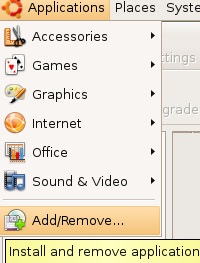
From the taskbar, access Application then Add/Remove Applications.
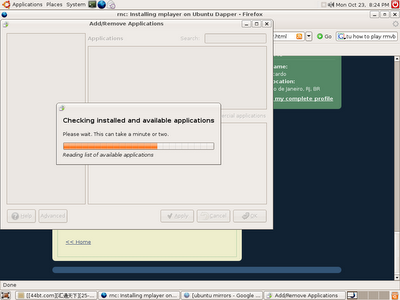
Once activated, the program need to conduct some checks on installed components and their dependencies and etc. You just gotta wait.
Step 2:
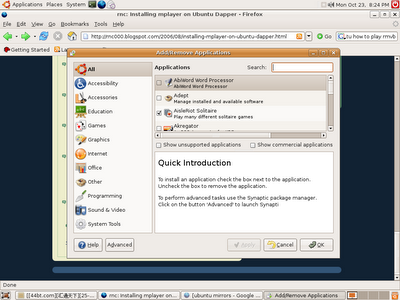
Click on the Advanced button on your bottom left corner of the Add/Remove Applications window.
Step 3:
Then you will be in Advanced mode.
Note: The system might prompt you to enter password for authorization.
Step 4:
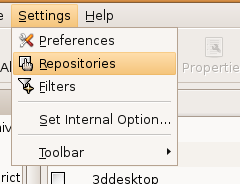
You need to add a new entry to the repository. Activate the repository settings screen through Settings -> Repositories from the same window.
Step 5:
Add a new channel, by click on Add button.
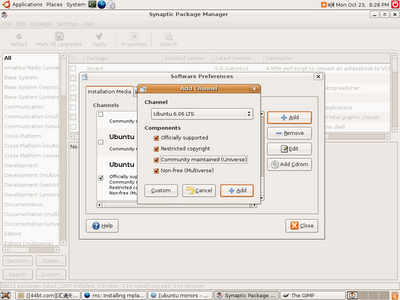
Make sure you select all the options on the Add Channel screen. and click Add.
Step 6:
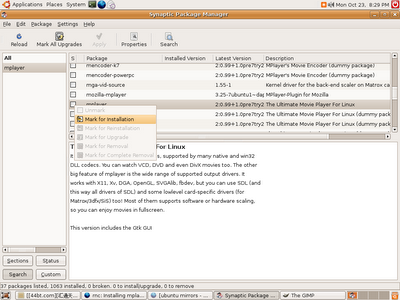
Once added, you click on the Reload button on your top left corner to refresh the list of programs. Then You can start to search for this software called "mplayer".
Click on the Search button on the menu bar, and enter "mplayer" and hit search.
The search results should be displayed on the pane at your right handside.
Step 7:
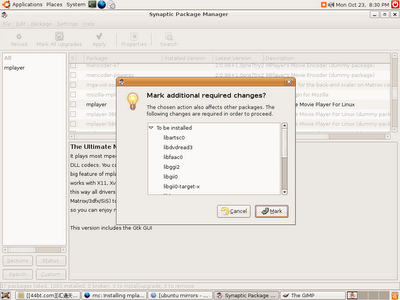
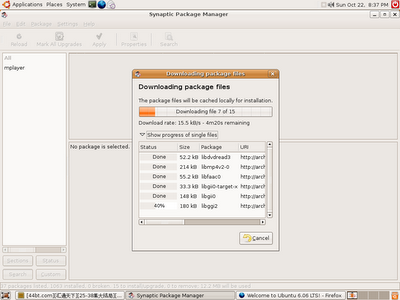
Once searched, click "Apply" on the same menu bar like Search. It will prompt you a list of to be installed programs.
Step 8:
Your system might not have the CODECS requires to play RMVB files. repeat the steps again, but this time search for "win32codecs". Good luck.
The GUI Based of package management tool (Synaptic Packager Manager) alleviates the prerequisite of understanding and using apt-get, wajig and other similar kind of utilities.
Here, I presented a step by step guide on how to setup your UBUNTU box to enable it to play RMVB (A famous media file format, usually used to share video on BitTorrent network in Asia).
Step 1:
From the taskbar, access Application then Add/Remove Applications.

Once activated, the program need to conduct some checks on installed components and their dependencies and etc. You just gotta wait.

Step 2:
Click on the Advanced button on your bottom left corner of the Add/Remove Applications window.

Step 3:
Then you will be in Advanced mode.
Note: The system might prompt you to enter password for authorization.
Step 4:
You need to add a new entry to the repository. Activate the repository settings screen through Settings -> Repositories from the same window.

Step 5:
Add a new channel, by click on Add button.

Make sure you select all the options on the Add Channel screen. and click Add.

Step 6:
Once added, you click on the Reload button on your top left corner to refresh the list of programs. Then You can start to search for this software called "mplayer".
Click on the Search button on the menu bar, and enter "mplayer" and hit search.
The search results should be displayed on the pane at your right handside.

Step 7:
Once searched, click "Apply" on the same menu bar like Search. It will prompt you a list of to be installed programs.

Step 8:
Your system might not have the CODECS requires to play RMVB files. repeat the steps again, but this time search for "win32codecs". Good luck.
Subscribe to:
Posts (Atom)