A typical situation in Malaysia's major highway is that you are able to see so many trucks on the move, carrying containers, goods, woods, and any kind of transportable items you can imagine.
Another typical situation is the presence of unwanted objects on the road, obstacles I would call them that might hinder the smoothness of your driving experience. These are usually paper boxes, stones, relatively small objects.
Today, I learnt another lesson of why you shouldn't drive behind a large truck. Besides the risk of stones dropping on your windscreen from these vehicles, they also prohibit you from seeing what's up in front on the road.
Driving at the speed of 90-100 kilometers per hour, behind a truck (as you might guessed), I caught by surprise by a metal rod rolling towards my car, which I only saw after that bloody truck driver avoid it at last minute. Roughly 1.5 meter long, 30 cm diameter with some funny sting on it. On the left lane is another truck, while on the right lane is a Toyota Altis moved at the speed of 110kmph. I got no choice but to roll over that "thing". The car movement direction skewed nearly 70 degrees. What a stunt you might think, my life is indeed on the stake.
No life casualty due the impact, however my passenger's left wheel is rendered useless and the alloy rim slightly bended.
The morale of the story is that do not drives near any trucks in whatsoever direction; they are killing machine, although they failed to kill today. And beware of funny looking metal rod.
Wednesday, September 13, 2006


Sunday, September 10, 2006
Mistake Mistake
The multithreaded Java application I wrote in April 06 for extracting data from 90k files to IBM DB2 v8.2 system suffering from performance bottleneck when dealing with too many worker threads. This is a common issue for multithreading programming and that's why we got something called Thread Pool. While waiting for the extraction to be finished (God, it has been running for 30 hours and still executing at this moment), I took some initiatives to perform a code review, trying to identify possible programming faults. And oh yeah, found a potential program problem. See figures below
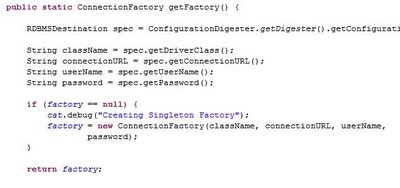
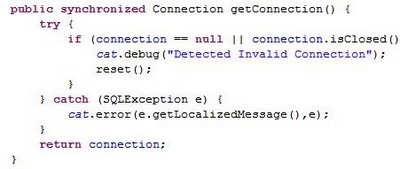
What you think is wrong with the above code snippets? Well, I try to recall the rationale of doing the stuff like that when I was developing this program and I think I did that to avoid the intricacy of thread synchronization due to very constrained assigned time frame.
I wouldn't tell you what's wrong with it and I hope you can spend some time exploring it out. However I can tell you that one of the way to get out from this scalability issue is to using java.lang.ThreadLocal to manage the connection instead.
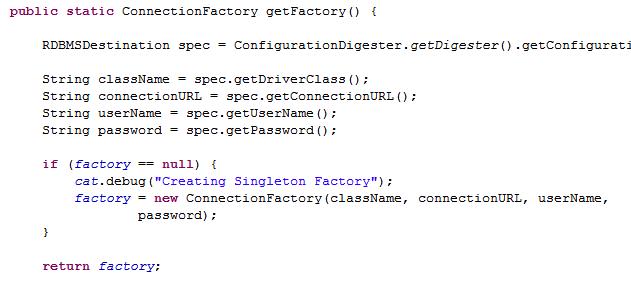

What you think is wrong with the above code snippets? Well, I try to recall the rationale of doing the stuff like that when I was developing this program and I think I did that to avoid the intricacy of thread synchronization due to very constrained assigned time frame.
I wouldn't tell you what's wrong with it and I hope you can spend some time exploring it out. However I can tell you that one of the way to get out from this scalability issue is to using java.lang.ThreadLocal to manage the connection instead.
Tons of POS Transaction File
For the purpose of POC for a retail company's data mining initiative (again), I being trashed with 90k number of small files containing 1 year POS transactional data, nearly double the amount of files/data for previous POC effort. Almost 70% of these files are compressed in Z format. Made a quick study on java.util.zip package provided in Java SDK 1.4.2 (The package is available from SDK 1.1), no luck, the standard facility only supports ZIP and GZIP formats. Ok, fine. I made a search in sourceforge, looking for any open source java implementation. None of the search results are directly useful to my decompression need. Then, I tried Winzip, WinRAR, PowerZip and etc. Emmmm, most of the Windows GUI version of these programs are able to decompress Z archive, however none of them provide batch processing. Darn, I not going to decompress 90k files one by one, am I look like that dumb? Ok, thinking of command line version of Winzip and Winrar. Ooops, unfortunately enough, they don't supports Z format in their command line version.
Decided to do some research on Z archive and found this useful article
Uncompress gz and Z format
It seems to me that Z format and many other compression formats are natively supported by UNIX systems. So sad for Windows users.
Also, read this
Wikipedia: List of archive formats
Uppercase .Z is a different format compared to lowercase .z file. Generally .Z is produced using UNIX's compress command, whereby .z is by UNIX's pack command. Algorithms used for the compression are different too.
Since I only got limited time for this decompression task, I finally settled with GUNZIP program, that's freely available (http://www.gzip.org/) and performed a batch decompression. Proceed to the ETL phase then.
And here is a forum post that I found stating similar decompression requirement. Most probably I will use Runtime.exec to call out external utility such as GUNZIP, rather than trying to find a Java implementation for integration. Anyway, it's depends on the amount of time I have.
Similar Issue
Decided to do some research on Z archive and found this useful article
Uncompress gz and Z format
It seems to me that Z format and many other compression formats are natively supported by UNIX systems. So sad for Windows users.
Also, read this
Wikipedia: List of archive formats
Uppercase .Z is a different format compared to lowercase .z file. Generally .Z is produced using UNIX's compress command, whereby .z is by UNIX's pack command. Algorithms used for the compression are different too.
Since I only got limited time for this decompression task, I finally settled with GUNZIP program, that's freely available (http://www.gzip.org/) and performed a batch decompression. Proceed to the ETL phase then.
And here is a forum post that I found stating similar decompression requirement. Most probably I will use Runtime.exec to call out external utility such as GUNZIP, rather than trying to find a Java implementation for integration. Anyway, it's depends on the amount of time I have.
Similar Issue
Subscribe to:
Posts (Atom)